Flow: Make a Little Room to Unwind
I made a thing! It’s called Flow, and it’s an instrument for making visualized ambient music in your browser.
I’ve spent a lot of time with online noise and ambient sound generators. They’re amazing when I want to listen to something, but I don’t know what, or I’m feeling indecisive, or I just need a little noise so I can focus or relax. The thing is, most of them are just different flavors of noise. Rain. Fans. Brown noise. I always wished there were more musical options.
So I made one. And because I can’t help myself, I paired it with a visual that’s intimately tied to every sound you hear.
Color, Water and Notes
I’ve always loved messing around with fluid solvers. I can’t say I fully understand the math and physics behind them, but as a programming challenge, I’ve never gotten tired of exploring what they can do.
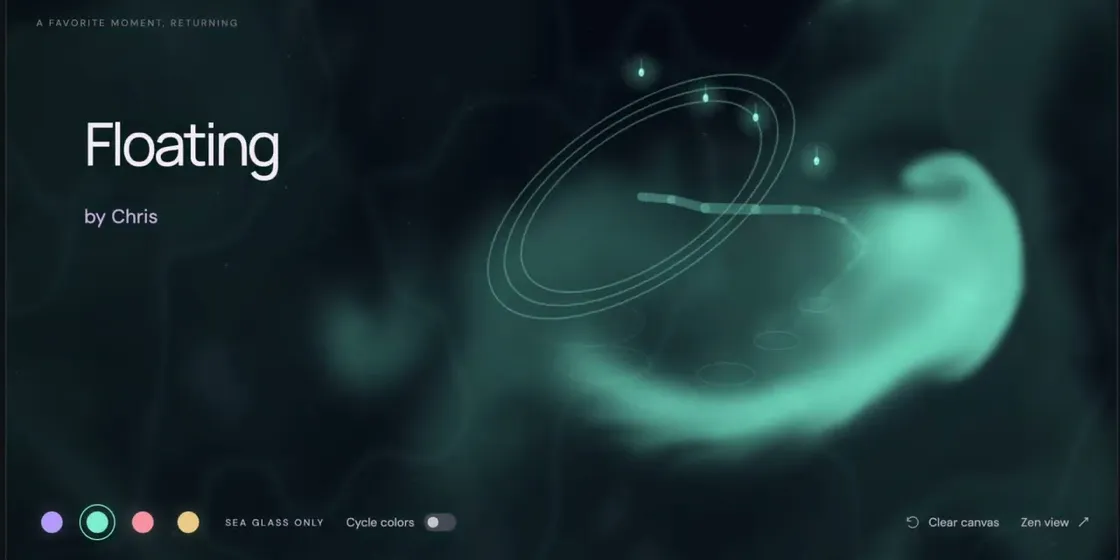
In Flow, every droplet that hits the canvas brings a note and a splash of color into a pool of moving water. Where it lands decides which note of the chord it plays, and its color decides which instrument plays it. Currents carry the ink around, chords shift the light, and the scene finds its own pace. To me, the splashing and stirring of the liquid blends so well with the sounds. It’s almost synesthesia, with what you see and what you hear melting into one experience.
You don’t have to touch anything, though. Turn on Automatic droplets and Flow will keep picking fresh notes and positions within the harmony you’ve chosen. Leave it running and the music keeps unfolding in new combinations rather than looping a fixed recording.
An Instrument, Not a Prompt
It’s a weird time for the internet. There’s a lot of focus right now on using AI to generate content directly: songs, videos, text, all of it. You type a prompt and something comes back.
I wanted to point AI in a different direction. Flow was built with AI coding tools, but it doesn’t generate your music. It’s an instrument. A person picks the sounds, the chords and the motion, and Flow brings those choices to life. That’s what the “authored by humans” tagline on the site is about.
The coding tools are what made Flow possible at all. The very first prototype came out of a single prompt that roughly described the core idea: drop droplets into fluid and have them make sounds. From there, it was a few nights and weekends of iterating. I’d estimate about 20 hours total, and a big chunk of that was just playing it to figure out where I wanted to take it next.
That’s the part that gets me excited. These tools have knocked down a lot of the barriers that stood between me and the fun tools and toys I’ve always wanted to make. We don’t have to use AI to generate art for each other. We can use it to make each other instruments, tools and all kinds of fun things that help people be creative rather than replace them.
Knowing When to Stop Adding Knobs
The hardest part wasn’t technical. It was deciding what not to build.
I am a huge fan of knobs and sliders, and that love kept pushing Flow toward becoming a full-blown DAW. That would be cool! But it’s not why Flow exists. So every new feature had to earn its place without making the thing harder to use or understand.
Where I landed is something you can use as little or as much as you like. Choose New session, press Play and pick a soundscape that suits your mood. You could stop right there and get on with your day. No music theory required.
But if you’re a knob person like me, there’s plenty to dig into:
- Layers adds an arpeggiator, a little percussion or an atmosphere like Soft rain, Tidal shore, Canopy wind, Summer night or Hearth. (Those environments are synthesized right in your browser, not played from field recordings.)
- Play turns the canvas into an instrument. Tap for a note, drag for a ribbon of color and sound. Slow strokes linger, quick ones sparkle. Hold and release for a bloom, or draw circles to stir things up.
- Scene has the colors and motion, and Mix lets you balance each layer.
If you only try one thing, make it the arpeggiator. Dial in just enough randomness, reverb and echo, and you get these gorgeous textures that drift really nicely from chord to chord. It’s one of my favorite parts of the whole app.
Keep It, Share It
When you hit on a stretch you love, record it and play it back as a loop. You can save it in your browser, download a session file or export a WAV.
There’s also a community library where people share what they’ve made. You’ll only need to sign in if you want to share your own music or like someone else’s. Listening, playing and saving are open to everyone, no account required.
What’s Next
I’m still exploring the edges of this instrument and finding new ways to make it more expressive. There are so many great patterns and sounds hiding in there.
Bigger picture, I want Flow to be a springboard. I’m already thinking about what other kinds of software I could make that let people create their own new works.
Flow is free to use. There are no ads, and there never will be. The whole thing is open source on GitHub under the GPL. Huge thanks to Sergey Surikov for WebAudioFont and Frank Wen for the FluidR3 soundfont, which make all the lovely instrument sounds possible.
So go start your own flow. Find a vibe, and let the music keep you company. If you make something you love, share it with the community. I’d love to hear it.